

Introduction
“Success is not final, failure is not fatal, it is the courage to continue that counts.” — Winston Churchill, Former Prime Minister of the United Kingdom
AI for workflow automation now sits in that space between failure and courage. Many leadership teams have run clever AI pilots, yet daily work, behavior, and performance still feel the same. Dashboards look impressive, but habits on the ground hardly shift.
The problem is simple. We automate tasks, but we rarely connect those automations to how leaders learn, decide, and behave. That gap turns AI programs into cost centers instead of engines for measurable leadership impact and talent growth.
In this guide, I show how we can use AI for workflow automation to link everyday processes with leadership development, coaching, and culture. We focus on clear definitions, readiness signals, high‑impact use cases, platform choices, design steps, governance, and how iAvva AI closes the last mile between automation and real behavior change.
If that is the impact you want from AI, keep reading and choose one workflow to redesign as you go.
Key Takeaways
AI for workflow automation becomes a leadership tool when it shapes daily behavior, not just system events. When we connect workflows to coaching and feedback, leaders gain consistent support across time zones, levels, and roles.
AI workflow automation moves AI from small pilots into the core of leadership and people operations. It links HRIS, LMS, and collaboration tools in repeatable ways. Leaders can finally see the same patterns and support across the whole organization.
Human capability must grow alongside automation for results to stick. When we combine AI prompts with reflection and coaching, habits change instead of sliding back. iAvva AI focuses on that human side of the equation.
Impact has to show up in real metrics, not only stories. We can tie workflows to OKRs, KPIs, time saved, and behavior indicators. That connection turns AI projects into part of the business plan.
People processes need guardrails around privacy, bias, and decision rights. Human‑in‑the‑loop checkpoints, audits, and clear rules help keep trust high. HR, L&D, and IT share that responsibility.
iAvva AI acts as a leadership intelligence layer on top of your automation tools. The stack moves data and triggers, while iAvva AI turns those signals into coaching, alignment, and measurable leader growth.
What Is AI For Workflow Automation And Why Does It Matter For Leaders?
AI for workflow automation means using AI models to read, decide, and act across tools without constant manual effort — a market that, according to Digital Transformation Market Size, analysis, is on a steep trajectory through 2034 as enterprises accelerate adoption. For leaders, this turns scattered data and tasks into structured support for coaching, development, and performance.
Instead of simple “if this, then that” rules, AI steps interpret emails, feedback, and survey comments, then route work or draft messages. When we combine that with human checkpoints, we get workflows that scale leadership support while keeping judgment with managers and HR.
Defining AI Workflow Automation In Plain Language
AI workflow automation uses large language models and related AI tools to power the middle of a process. The AI reads unstructured inputs, decides what they mean, and helps move work forward across systems like HRIS, LMS, CRM, Slack, and Microsoft Teams.
Traditional iPaaS tools and RPA scripts use fixed rules. They copy data from one system to another, or click through a legacy user interface, but they expect clean, labeled fields. When data is messy or the situation is subtle, they struggle.
AI workflows add interpretation, classification, and content generation on top of those pipes. The AI can:
- Summarize a 360 report
- Tag themes in exit interviews
- Draft a coaching nudge for a manager
- Decide whether an item relates to leadership, compliance, or IT support, then route it by meaning rather than code values
That is very different from free‑form agents that roam across tools with broad goals. In leadership and HR, we usually want governed workflows with clear steps, limits, and logs. The AI does the reading and writing, while humans still make sensitive calls about people, pay, and promotion.
Why AI Workflow Automation Is A Leadership And People Strategy Issue
AI workflow automation matters for leaders because it sits where talent, culture, and performance meet. According to recent research, organizations will spend about 3.4 trillion dollars on digital transformation by 2026, yet much of that investment is at risk — as one analysis titled $3.4 Trillion Down the Drain found, 84% of digital transformation projects still fail despite massive investments. Research published by Fortune, drawing on BCG behavioral science work, confirms that We found the real reason 70% of transformations fail is rooted in leadership and culture gaps, not technology shortfalls.
Leaders now face fragmented tool stacks, constant change, and rising pressure from boards to use AI wisely. When leadership development and people operations stay manual, they simply cannot keep up with that pace. Program teams spend more time moving data than coaching people.
AI workflows help scale coaching, learning, and feedback without adding the same amount of headcount. They standardize high‑quality manager guidance across locations and shifts, while still letting local leaders adapt to their teams. They also shorten the path from feedback to learning to visible behavior change.
This is why CHROs, CLOs, CIOs, and business leaders need to share ownership of AI for workflow automation. If we leave it only to IT, we end up with fast pipelines that do not support the human side of performance.
When Is Your Organization Ready For AI For Workflow Automation?
An organization is ready for AI for workflow automation when manual work patterns repeat, processes cross many systems, and AI pilots pile up without scaling. At that stage, the pain from staying manual is higher than the effort of building structured workflows.
For HR, L&D, and operations teams, this readiness shows up in daily habits across spreadsheets, inboxes, and side conversations. When we see those patterns, we can move from ad‑hoc prompting in ChatGPT to governed, shared workflows that serve the whole organization.
Readiness Signals In HR, L&D, And Operations
Clear readiness signals appear first in the “last mile” of people processes. HR business partners and L&D teams copy data between HRIS, LMS, survey tools, and slide decks over and over again. Managers write near‑identical feedback emails to different team members each week.
Common signs include:
- Repetitive manual tasks: moving data between HRIS, LMS, survey tools, email, and slide decks
- Multi‑system processes: each core process needs three or more systems to work
- Copy‑paste dependence: staff constantly paste text into ChatGPT or similar tools for the same tasks
- AI pilot fatigue: clever demos with no route into production and no governance path
Another signal appears when every core process needs three or more systems. A leadership program might need HRIS data for eligibility, LMS records for completions, a 360 platform for feedback, and Slack channels for engagement. Without automation, someone spends hours connecting those dots.
We also see readiness when staff frequently use general AI tools to:
- Summarize manager comments
- Rewrite feedback in clearer language
- Extract action items from transcripts or meeting notes
That pattern means the logic is stable enough for a workflow.
A final warning sign is AI pilot fatigue. Teams run a clever demo, then nothing moves into production because there is no path, governance, or IT support. Research from MIT Sloan Management Review notes that only about 5 percent of enterprise AI pilots reach stable production — a pattern explored in depth by The Seventy Percent: Why IT Transformation Has Remained Statistically Difficult for Twelve Years, which traces why this difficulty has persisted across more than a decade of enterprise investment. AI workflow platforms exist precisely to close this gap.
Conditions You Need In Place Before Scaling AI Workflows
Before we push AI workflows into people processes, we need a few basics. HRIS and LMS data must be clean enough to trust, and those systems should have APIs or stable exports. Without that, we risk automating confusion.
We also need:
- An executive sponsor who cares about both people and performance (CHRO, CLO, CIO, or COO)
- Agreed success metrics tied to OKRs and KPIs
- Clear governance basics covering:
- Who can see which people data
- Which decisions AI can only suggest
- Which decisions always need human sign‑off
A small AI governance group that includes HR, IT, Legal, and a business leader can start with a simple charter and expand as experience grows.
Culture plays a role too. Leaders must be willing to look at data about their own habits, such as feedback frequency or 1:1 quality. When senior leaders work on their own behavior inside these workflows, everyone else takes them more seriously.
Tip: Start by piloting with leaders who are already curious about AI and coaching. Early champions reduce resistance and provide credible peer stories.
Which AI Workflow Use Cases Deliver The Highest Impact For Leadership And Learning?
The highest impact use cases for AI for workflow automation in leadership and learning are repeatable processes tied to behavior, not just content. These include adaptive learning paths, scalable coaching, new leader onboarding, skills intelligence, and culture monitoring.
When we turn these patterns into workflows, we move from one‑off experiments to ongoing systems that HR and L&D can observe, adjust, and trust. iAvva AI focuses on these people‑centered workflows, so AI supports daily practice rather than just background data flows.
High‑Impact Workflow Patterns For Leadership And Talent
Several workflow patterns consistently repay the effort to automate.
Adaptive Leadership Learning Paths
Adaptive paths use data like:- Role and level
- Past training and completions
- Survey themes and engagement data
- Manager input and current priorities
AI selects content, reflection prompts, and practice tasks for eight to twelve week micro‑paths, then sends nudges through email, Slack, or Microsoft Teams. Leaders receive the right challenge at the right time rather than a generic curriculum.
Scalable Coaching And Feedback Support
After a 1:1 or project milestone, leaders capture a quick reflection. AI:- Summarizes themes
- Links them to your leadership model
- Suggests one or two behavior experiments for the coming week
- Schedules short nudges and reminders at relevant moments
This pattern makes coaching more continuous and aligned with real work.
New Leader Onboarding And Role Changes
When HRIS records a move into a manager or director role, the workflow drafts a 30/60/90 day plan. It pulls:- Team structure from HRIS
- Priorities from project tools
- Recent sentiment data from surveys
It then schedules check‑ins and nudges that help the new leader build trust, clarity, and psychological safety.
Skills Intelligence And Succession Planning
Skills workflows gather data from performance reviews, internal mobility, projects, and learning participation. AI infers skills and leadership behaviors and flags “ready now” and “ready soon” pools for key roles. HR still decides, but the data preparation happens automatically.Continuous Voice‑Of‑Employee And Culture Monitoring
Culture monitoring workflows read survey comments, exit interviews, and other text channels where policy allows. AI tags themes such as workload, recognition, or psychological safety, then routes patterns to HR and business leaders with suggested leadership responses.
As management scholar Amy Edmondson notes, “Psychological safety is not about being nice. It’s about giving candid feedback, openly admitting mistakes, and learning from each other.” AI‑supported culture workflows can help leaders get there faster.
Sample Paths From Manual Pain Point To Automated Leadership Workflow
To make this real, I like to start with a painful manual process and track the “before and after.”
1. Leadership Program Operations
Before automation:
- Program coordinators juggle spreadsheets, ad‑hoc emails, and late‑night reminders
- Little visibility into who is actually progressing
- Managers receive fragmented updates, if any
With AI for workflow automation:
- HRIS data flows into the LMS to enroll the right people
- Collaboration tools set up groups and reminders
- AI drafts reminder messages in natural language that matches your culture
- Messages go out at the right moments based on activity, not guesswork
- Managers and sponsors receive periodic AI‑generated summaries of engagement and completion
2. Feedback Overload And 360 Programs
Before automation:
- Managers receive long 360 reports and open‑ended survey comments
- HR spends days summarizing themes into slide decks
- Insights arrive late, after energy and momentum have faded
Using AI workflows:
- All comments feed into a central process
- AI clusters themes, adds sentiment, and writes plain‑language talking points for managers and HR business partners
- Talking points then shape 1:1s, team meetings, and coaching actions
- Leaders receive prompts for concrete next steps instead of abstract reports
For each path, we can track metrics such as:
- Hours saved per month
- Increase in completion or attendance
- Time between feedback and visible behavior changes
According to Harvard Business Review, leadership and culture gaps drive many digital change failures, so even small shifts in these metrics matter.
How To Choose The Right AI Workflow Automation Platforms (And Where iAvva AI Fits)
Choosing tools for AI for workflow automation means balancing ease for HR and L&D, depth for IT, and safety for people data. No single platform does everything, so we need a clear way to compare options and decide how they work together.
General‑purpose automation tools handle triggers, integrations, and routing. iAvva AI then sits on top as the specialist for leadership behavior change, coaching, and analytics, giving your workflows a human‑centered “brain” rather than just pipes.
Evaluation Criteria For HR, L&D, And IT Leaders
When we evaluate platforms, I like to use a simple scorecard.
Key criteria include:
Time To First Useful Automation
- Can a non‑technical partner build or adjust a basic workflow within an hour using a visual builder and templates?
- Are there prebuilt HR and L&D patterns (e.g., feedback summaries, reminders, learning paths)?
AI‑Native Building Blocks
Look for:- Retrieval‑augmented generation on your policies and leadership models
- Semantic routing by meaning, not just keywords
- Structured prompt management and versioning
- Human‑in‑the‑loop steps that block risky automation
Tools like Gumloop, n8n, Zapier, Workato, and Microsoft Power Automate all sit on this spectrum.
Governance And Security
Especially critical for people data. Seek:- Role‑based access control
- Audit logs with clear histories
- Secrets management and encryption
- A compliance posture that matches your industry
Enterprise tools such as Workato or StackAI, and self‑hostable options like n8n, give IT strong levers here.
Observability And Cost Control
Good platforms show:- Run‑level logs
- Step‑level latency
- Per‑workflow cost estimates
That level of detail helps finance, HR, and IT see where money and time go.
Integration Breadth
Integration with:- HRIS (Workday, BambooHR, SAP SuccessFactors, etc.)
- LMS platforms (Cornerstone, Docebo, others)
- Coaching and leadership platforms like iAvva AI
- Survey and collaboration tools (Qualtrics, Office 365, Slack, Google Workspace)
With these dimensions, we can score vendors from one to five in a simple table and compare them side by side after demos.
Recommendation: Run at least one live prototype during vendor evaluation. Watching a real HR or L&D use case built in front of you says more than any slide deck.
How iAvva AI Complements Your Automation Stack
iAvva AI does not try to replace your iPaaS or low‑code automation tools. Instead, iAvva AI functions as a leadership and learning intelligence layer that plugs into them. Your automation stack handles triggers and data flows, while iAvva AI shapes leadership behavior.
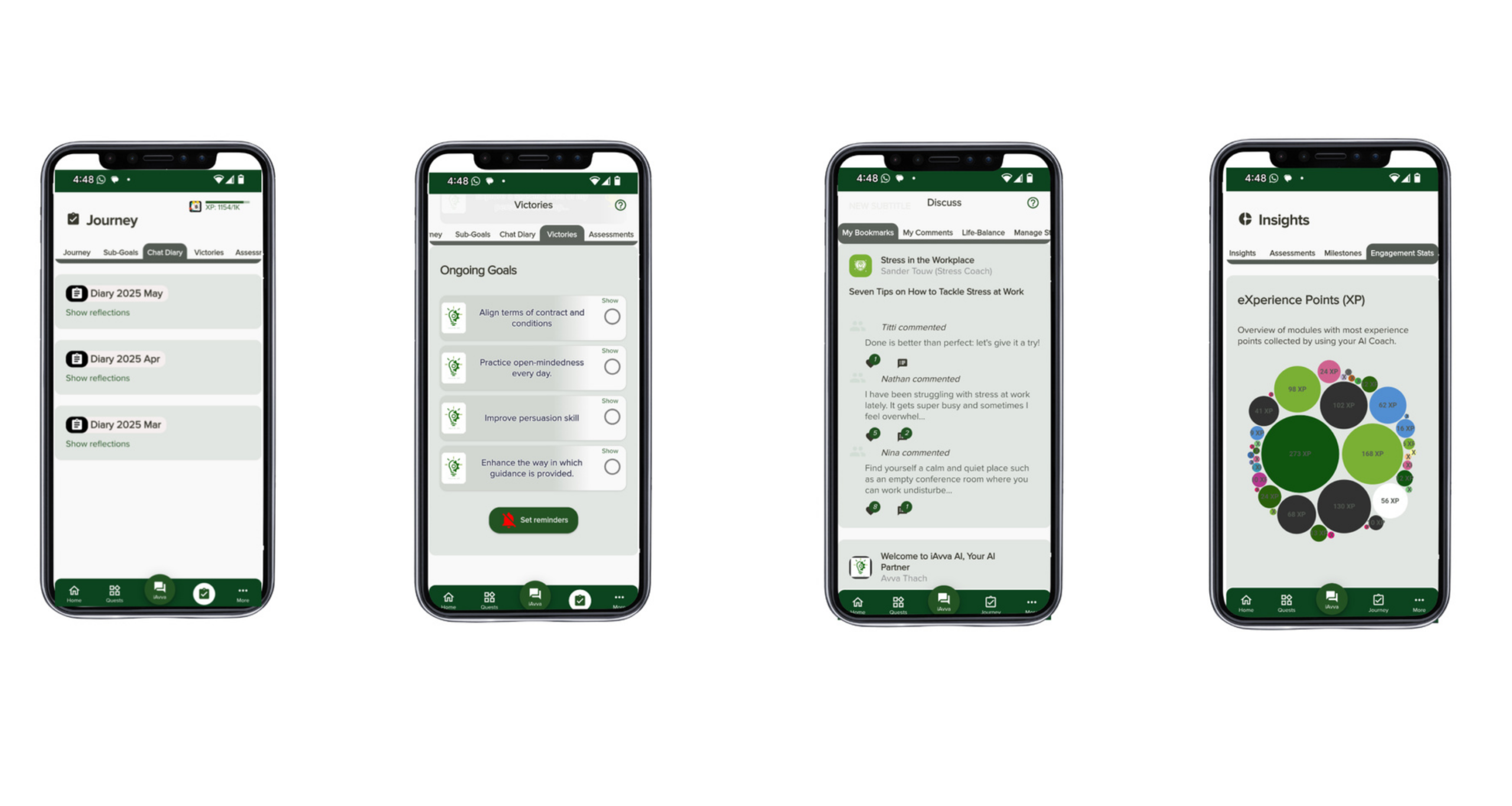
At the core is the iAvva AI Coach platform. It delivers five‑minute self‑reflection and micro‑coaching flows on web, iOS, and Android in 19 languages. Daily prompts draw on neuroscience, positive psychology, and ICF coaching principles, so leaders build stronger habits in small, repeatable steps.
Key elements include:
- iAvva AI Coach for daily prompts, reflection, and micro‑coaching
- Strategic Alignment Engine that connects individual goals with organizational OKRs
- Real‑time analytics dashboards for HR and L&D showing engagement and growth signals
From an architecture view:
- Automation tools (Workato, n8n, Zapier, Microsoft Power Automate, etc.) trigger workflows based on HRIS and LMS events.
- Those workflows send leaders into iAvva AI paths (for example, a reflection after a performance review or course completion).
- iAvva AI returns analytics and status data to enterprise dashboards in Power BI, Tableau, or similar tools.
Compared with generic platforms, iAvva AI adds clear ROI on:
- Leadership strength
- Middle‑management uplift
- Culture change and alignment with strategy
How Can Leaders Design AI Workflows For Measurable Impact (Not Just Activity)?
Leaders can design AI for workflow automation with impact by starting from a clear people problem, mapping the current process, and adding AI only where it helps interpretation or communication. Every workflow then needs human checkpoints and a measurement plan tied to OKRs and KPIs.
When we follow a simple step‑by‑step method, AI workflows move from clever activity to repeatable engines for behavior change. iAvva AI often works with HR, L&D, and IT teams to guide this design work.
A Step‑By‑Step Framework For AI Workflow Design
I like to use an eight‑step pattern when we design workflows for people processes.
Select A High‑Friction, Repeatable Workflow
Examples:- Leadership program follow‑ups
- 360 feedback summaries
- New leader onboarding
It should have enough volume to matter, but not be so sensitive that a mistake would harm trust.
Map The Current Manual Process
On a whiteboard or digital board, capture:- Inputs and sources
- Decisions and handoffs
- Outputs and recipients
- Systems currently in use
Focus on how work really happens, not how policy says it should.
Mark “Fuzzy” Steps
Highlight steps that depend on reading or writing, such as:- Summarizing comments
- Choosing themes or categories
- Drafting messages and recommendations
These are natural spots for AI, because they depend on language and judgment.
Decide Where Humans Must Stay Fully In Control
For example, always keep human review on:
- Promotions and ratings
- Sensitive feedback or corrective action
- Any decision that changes pay, role, or employment status
Choose Platforms And Define Data Contracts
Work with IT to:
- Select the automation backbone
- Decide how HRIS, LMS, and collaboration tools will connect
- Clarify what data fields flow into AI steps and what stays out
Build A Small MVP Automation
Keep the first version narrow:
- Limited set of users or one pilot cohort
- Clear start and end points
- Simple prompts and logic that can be easily inspected
Pilot, Gather Feedback, And Iterate
Collect input from:
- HR partners
- Managers and employees in the workflow
- IT, on performance and security
Adjust prompts, timing, and handoffs based on real usage.
Assign An Owner And Document The Workflow
The owner, often an HR or L&D leader, is responsible for:
- Watching metrics
- Scheduling reviews
- Coordinating changes when policies or systems shift
“You can’t improve what you don’t measure,” Peter Drucker is often quoted as saying. Building measurement into the workflow from day one is non‑negotiable.
Measuring ROI From Time Saved To Behavior Change And Business Outcomes
Measurement should sit beside design, not trail it. I like to frame ROI for AI for workflow automation in three tiers.
Operational Metrics
Track:
- Hours saved and time reclaimed for higher‑value work
- Error reduction in data and communication
- Shorter cycle times for processes like performance reviews or onboarding
Learning And Behavior Metrics
Look at:
- Engagement with leadership paths inside iAvva AI
- Reflection frequency and completion of micro‑coaching sessions
- Signs of new habits such as:
- More regular 1:1s
- Timely feedback after key events
- Better documentation of decisions
According to C-Suite Digital Transformation Statistics 2026, executive priorities and spending data confirm that digital change efforts consistently falter when behavior does not shift, making behavioral metrics as critical as cost savings in any ROI model.
Business Outcomes
Connect workflows to:
- Team performance indicators
- Engagement scores
- Retention for key roles
- Health of the leadership pipeline
OKRs help by linking each workflow to goals such as:
- “Increase manager feedback quality”
- “Reduce time between feedback and coaching action”
- “Improve readiness of successors for critical roles”
iAvva AI supports this measurement with built‑in OKR alignment and analytics dashboards. HR and L&D teams can see which workflows and prompts drive the most insight and growth. For boards and executives, we can present short, data‑rich stories that connect AI workflows with people and business results.
How Do We Govern AI Workflows In People And Performance Domains Responsibly?
Governance for AI for workflow automation in people domains means setting clear rules for human oversight, bias checks, privacy, and transparency. Without this, even helpful workflows can erode trust and invite legal risk.
When HR, L&D, IT, and Legal share a simple but firm framework, we can move faster with less fear. iAvva AI is built with these guardrails in mind, from design patterns to platform security.
Human‑In‑The‑Loop, Bias, And Privacy Guardrails
Good design keeps people in charge of people decisions. In our workflows, AI prepares but humans decide. For example, AI can:
- Summarize 360 feedback
- Cluster themes from survey comments
- Draft coaching notes or recognition messages
But managers and HR partners still make final calls on ratings, promotions, or corrective steps.
Bias and fairness require special care. Historical performance data and feedback often reflect past bias, so feeding them directly into AI can repeat those patterns. Instead, we prefer:
- Curated leadership frameworks
- Behavior‑based examples
- Evaluation sets that include edge cases across gender, ethnicity, age, location, and role
Regular audits help too. HR, Legal, and DEI partners can review random samples of AI outputs by group where law allows. If we notice skew, we adjust prompts, reference data, or model choices. Research on DRFLOW: A Deep Research Benchmark for Personalized Workflow Prediction highlights how personalized workflow systems must account for individual variation and fairness considerations, reinforcing why unchecked bias in people-facing AI workflows creates both legal exposure and performance risk.
Privacy and data minimization sit at the core. We:
- Limit which fields flow into AI steps
- Avoid sending health or union data into general models
- Favor aggregated and pseudonymized data for culture analytics
iAvva AI supports GDPR‑aligned practices and encryption so leadership data remains secure while still useful.
Building Trust Transparency And Governance Practices
Trust grows when people know what AI does and does not do. We explain where AI touches their experience, such as:
- Summarizing feedback
- Suggesting learning content or practice ideas
- Drafting messages and check‑in prompts
We also state plainly that AI does not make final performance or promotion decisions and that humans can override any suggestion.
An internal AI governance board helps keep this clear. A small group spanning HR, L&D, IT, Legal, and business units:
- Reviews proposed workflows and their risk levels
- Approves deployment stages and target groups
- Maintains a catalog of live workflows, their owners, and review dates
Security choices matter as well. When we pair an enterprise‑grade automation backbone like Workato, StackAI, or n8n with a specialized platform like iAvva AI, we get both control and leadership focus. Role‑based access, audit logs, and clear environments for testing and production give teams confidence.
“Culture eats strategy for breakfast.” — Peter Drucker, Management Consultant and Author
That line reminds me that even the best AI plan fails without cultural trust. Transparent governance, simple language, and real options for feedback help people see these workflows as support, not surveillance.
How iAvva AI Turns AI Workflow Automation Into Daily Leadership Behavior Change
iAvva AI turns AI for workflow automation into daily leadership behavior change by blending micro‑coaching, reflection, and analytics with your existing systems. Instead of leaving AI buried inside back‑end processes, we put it in leaders’ hands in short, regular interactions.
Because we combine an enterprise‑grade coaching app with consulting, training, and human coaching, we help organizations close the last mile between digital change and lived behavior.
The iAvva AI Coach Platform As A Leadership Workflow Engine
The iAvva AI Coach platform acts as a workflow engine for leadership growth. Leaders spend about five minutes per session, on web, iOS, or Android, in any of 19 supported languages. They receive daily prompts shaped by neuroscience, positive psychology, and ICF coaching standards.
The platform offers two modes that adapt to context:
- Coach Mode focuses on questions and reflection
- Mentor Mode suggests concrete ideas and examples
Leaders can respond through text or audio, which helps global and neurodiverse workforces engage in ways that feel natural.
Behind the scenes, each prompt and response lives inside a structured workflow. Program milestones or HR events can trigger specific reflections, such as:
- After a new role start
- After a training module or workshop
- After a difficult conversation or project milestone
AI reads patterns across time and offers next‑step suggestions that fit the leader’s history and goals.
Because these workflows show up as small daily habits, not big events, behavior compounds quietly. Over weeks and months, leaders build stronger self‑awareness, communication patterns, and decision habits. According to internal feedback from early adopters and the Techstars accelerator network, leaders report higher focus and productivity with this approach.
Tip: Encourage leaders to block a recurring five‑minute slot in their calendars for iAvva AI sessions. Treat it as “gym time” for leadership skills.
From Strategy To Scale Consulting, Training, And Analytics With iAvva AI
The platform is only part of the story. iAvva AI also brings decades of consulting and coaching experience to help organizations design and run AI for workflow automation programs. Our AI strategy and automation consulting practice helps align:
- Business goals and OKRs
- People processes and leadership models
- Technical choices and governance
We draw on over 20 years of leadership coaching and large‑scale change work, including experience with a 22 billion‑dollar digital program at Accenture. That background helps us connect AI workflows with real change in how executives, middle managers, and teams operate day to day.
Human coaching sits beside the AI experiences. We offer:
- 1:1 coaching for C‑suite leaders and senior managers
- Group coaching for teams navigating AI‑driven change
- Support for middle managers, who often feel the most pressure
Those sessions complement the automated flows, bringing nuance and empathy to situations where a workflow alone would feel too cold.
Training and certification in AI‑defined IT project management help IT and project leaders run AI initiatives with more confidence. Analytics dashboards in iAvva AI then close the loop. HR and L&D teams can see:
- Engagement patterns by cohort and region
- Growth signals linked to specific prompts and workflows
- Program effectiveness over time
These insights feed back into future workflow design, content choices, and leadership strategies.
Moving Forward
Moving forward with AI for workflow automation in leadership and people operations is less about one big program and more about steady, visible steps. When we pick the right workflows, set clear guardrails, and keep behavior at the center, AI becomes a practical support for leaders, not a distant promise.
For many organizations, the next move is to choose a single high‑value workflow to redesign. It might be:
- Leadership program follow‑ups
- Feedback summaries
- New leader onboarding
From there, assemble a small cross‑functional team from HR, L&D, IT, and the business to design, pilot, and measure a first version.
As you see results, you can expand to more workflows and refine your governance model. Pairing your chosen automation backbone with iAvva AI gives you both the plumbing and the leadership intelligence to keep progress grounded in real behavior and business outcomes.
Conclusion
AI for workflow automation is now a leadership and culture lever, not only a technical upgrade. When we connect workflows to coaching, reflection, and performance, we turn everyday processes into practice fields for better leadership.
The most effective organizations will be those that align HR, L&D, IT, and business leaders around this shared agenda. With iAvva AI, you have a way to link AI workflows, human coaching, and analytics into one coherent system. The path starts with one workflow, one pilot, and a clear commitment to measurable, human‑centered impact.
Frequently Asked Questions
Question: How Is AI For Workflow Automation Different From Just Using ChatGPT In HR Or L&D?
AI for workflow automation creates governed, repeatable processes, while ad‑hoc ChatGPT use is one‑off and personal. Workflows plug into HRIS and LMS, follow clear steps, and record logs and approvals. That structure supports scale, compliance, and shared learning across teams, which casual prompting cannot offer.
Question: Where Should HR And L&D Teams Start With AI Workflow Automation If They Have Limited IT Support?
HR and L&D teams should start with low‑risk, high‑friction tasks such as reminders, feedback summaries, and simple reports. Approachable low‑code tools with templates, combined with a leadership‑focused platform like iAvva AI, can cover most of the logic. Involving IT early for light review keeps governance and security on track.
Question: How Can We Ensure AI Workflows Don’t Introduce Bias Into Performance Or Promotion Processes?
You can reduce bias by keeping AI assistive, not decision‑making, in performance and promotion. Use curated competency frameworks and behavior examples rather than raw historical labels. Run regular audits of AI outputs by group where legal, and involve HR, Legal, and DEI partners in design, testing, and ongoing review of each workflow.
Question: What Metrics Should We Track To Prove ROI On AI Workflow Automation In Leadership Development?
Track:
- Operational metrics like time saved, error reduction, and shorter cycle times
- Learning and behavior signals such as engagement with paths, reflection frequency, and coaching habit scores
- Business outcomes such as team performance, engagement, retention, and pipeline health
iAvva AI’s OKR alignment and analytics help bring these metrics into one view.
Question: How Does iAvva AI Integrate With Our Existing HR Tech Stack And Automation Tools?
iAvva AI connects as the leadership intelligence and experience layer. Automation platforms handle triggers and routing from HRIS, LMS, and collaboration tools, then call iAvva AI for coaching and alignment steps. APIs and connectors sync eligibility lists, milestones, and analytics back into your HR dashboards and reporting tools.
Question: Do We Need To Replace Our Existing Learning Programs To Use iAvva AI And AI Workflows?
No, you do not need to replace existing programs. AI workflows sit on top of your current content and experiences to extend them. iAvva AI turns static curricula into daily micro‑coaching and aligned habits. A good approach is to start with one existing program, layer AI support on top, and expand after you see results.













Leave a Reply